
What Is New in Kinetics Neo Version 3.5
Build 3.5.25155.8
Contents
New in Functionality
- New: Kinetic modelling for two-component reactions with different concentrations.
- New: Sample with different concentrations of Epoxy/Amine: DSC_Epoxy+Amine_Concentrations is added.
- New: Calculation of "real" temperature steps from ideal optimized temperature profile in Optimizations.
- New: Export of temperature steps from optimized results.
- New: Fit for Conversion Rate. Important for integral signals like TGA, DIL, Rheometry, DEA.
- New: New geographic map provider Azure Maps instead of obsolete and not available from 25.07.2025 Bing Maps.
New in Usability (based on customer feedback)
- New: User-selected visibility of curves in Model-Based and Model-Free charts can be saved and restored.
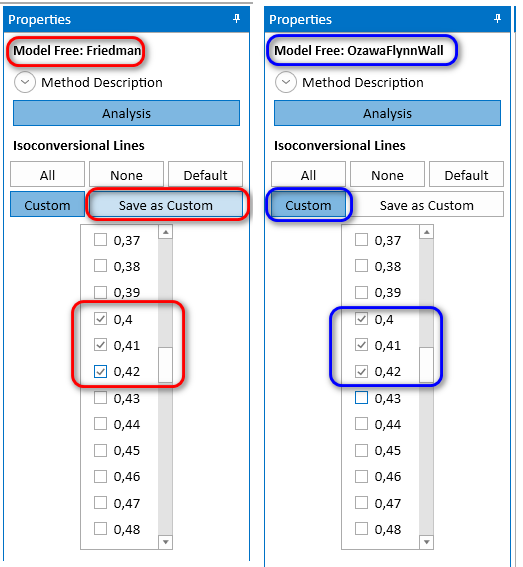
- New: Visibility of Isoconversional lines in Model-Free analysis can be changed and saved as "custom" and can be used for visibility of all model-free analysis methods.
- New: Autofill values in Model-Based analysis Propeties panel. Two new buttons are added: Reset to Inits (fill with measured values), and Set (fill with constant value from text box).
- New: Standard dialogs can now set to use color themes in Settings.
- New: Possibility to select weather station directly on the map by clicking on weather station in Climatic prediction.
- New: Possibility to open several data source (measurement) files in single action.
- Improved: Highlighted dash series when selected in chart or legend keep their stroke-space proportions. Only thickness is increased. The strokes are now correctly shown in the Legend.
Other Improvements, Bux Fixing
- Improved: Opening of KINX2 file created in newer versions of Kinetics Neo is now possible.
- Improved: Chart title is now centered over the chart itself, not over chart + legend.
- Improved: In chart legend the length of the lines is increased to correctly show different dashes.
- Improved: Standard dialogs now use Windows 11 style with rounded edges.
- Fixed: Value of project setting Show Import Dialog for Recognized Files was not correctly shown.
- Fixed: Loading of old KINX files was not possible in some cases.
- Other small improvements and bug fixes..
New: Kinetic modelling for two-component reactions with different concentrations
The main new feature of Kinetics Neo version 3.5 is the kinetic analysis and kinetic model for the two-component reaction A+B→C, where the ratio of reactants A and B (molar ratio or mass ratio) could be different.
Measurement data for kinetic analysis are the measurements under different temperature conditions and different concentration ratio for reactants. The ratio can be written as the molar ratio or as the mass ratio like 1:20 or 7:3.
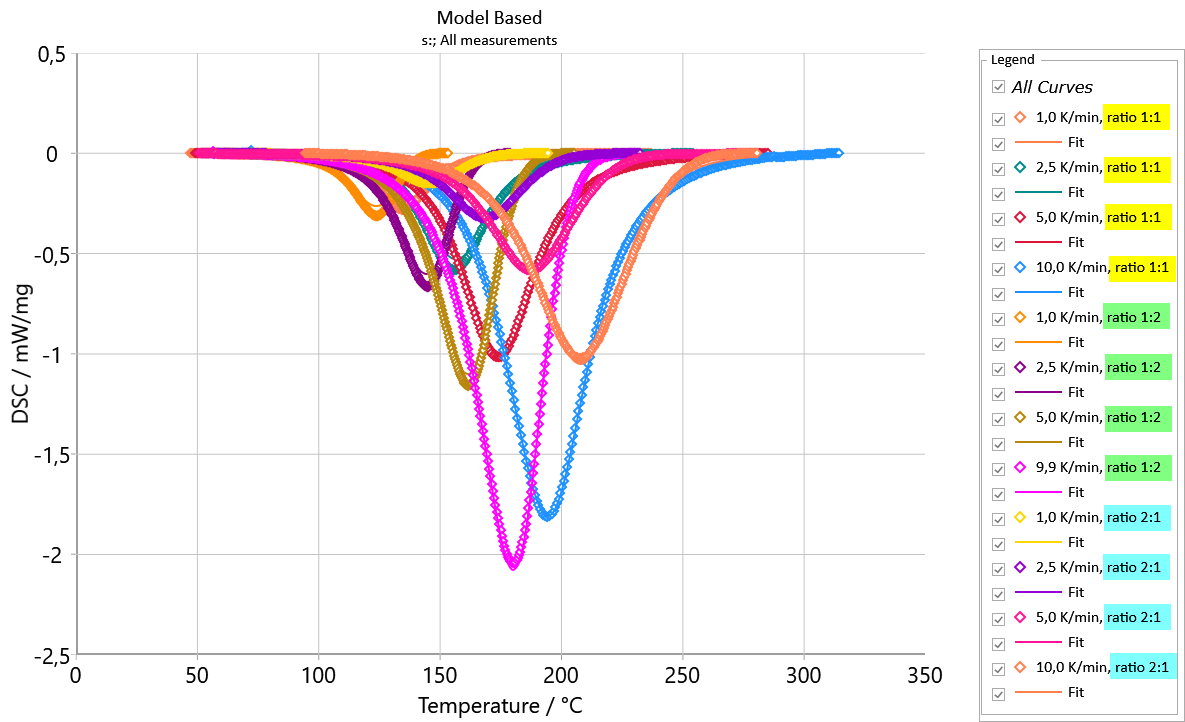
Kinetics Neo will help you to create one common model, depending on both temperature and the concentration ratio.
It is not necessary to know the molar masses of reactants and exact chemical reaction with stoichiometric coefficients. Kinetic analysis will find the reaction order of each reactant from the shape of the measured curves.
This model can be used for the prediction at different temperature conditions as well as at the given concentrations of reactants in two-component reaction.
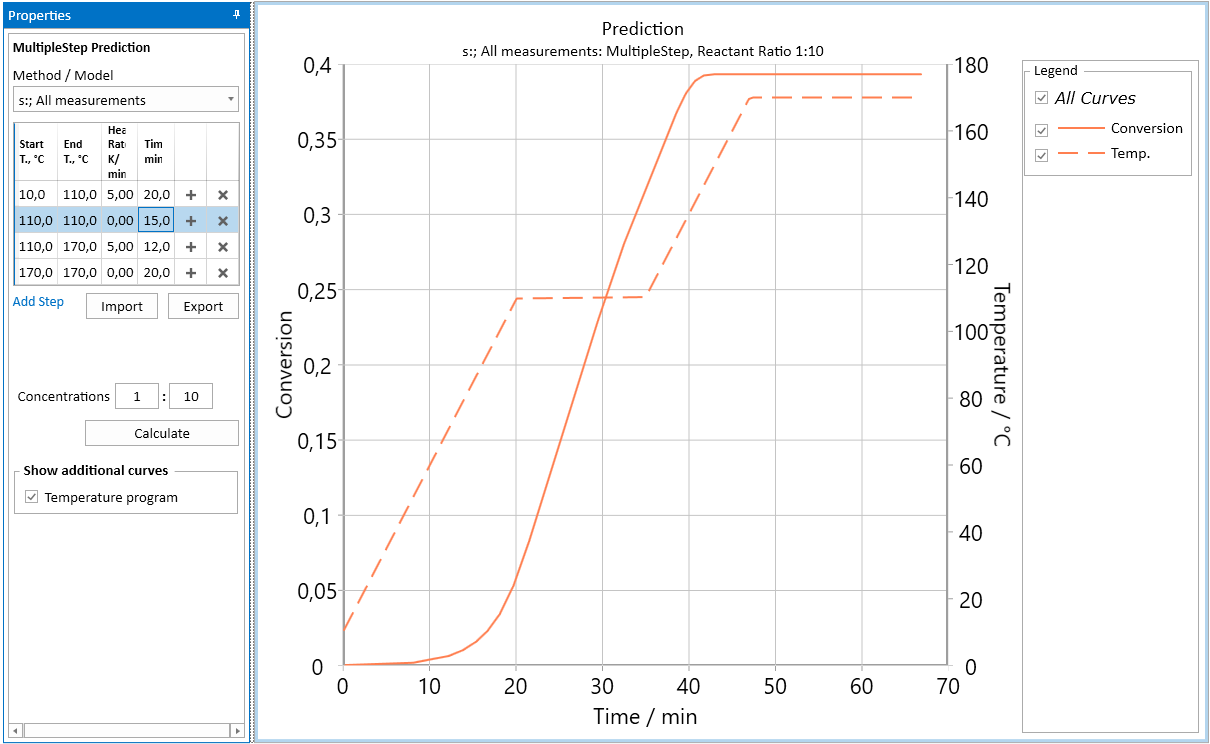
Additionally, the new analysis will find the dependence of the total reaction effect like reaction enthalpy, on the concentration ratio. Then the prediction of the reaction rate and heat production can be simulated for the given concentration ratio (mol ratio or mass ratio)
New: Sample with different concentrations of Epoxy/Amine: DSC_Epoxy+Amine_Concentrations
This new sample is added to the Samples directory. The new sample contains DSC measurements for curing of epoxy/amine system with different reactant ratios epoxy to amine.
New User Guide (two parts) is added for demonstrating the new kinetic analysis of this system:
Part1. How to Analyze Two-Component Reaction Depending on Component Concentrations.
New: User-selected Visibility of Curves in Model-Based and Model-Free Charts Can Be Saved and Reused
In Model-Based and in Model-Free Conversion Fit charts it is possible to save the visibility of the chart series, which are selected by the customer.
Details are shown on our Kinetics Neo Help web site.
New: Custom Visibility of Isoconversional Lines Can Be Saved and Reused
In Model-Free analysis often it is important to set your own visibility of Isoconversional lines, not always All / None / Default. Since version 3.5 of Kinetics Neo it is possible to adjust the visibility and save it. New Custom option can be allied to all Model-Free analysis.
Details are shown on our Kinetics Neo Help web site.
New: Autofill Values in Model-Based Analysis Propeties Panel
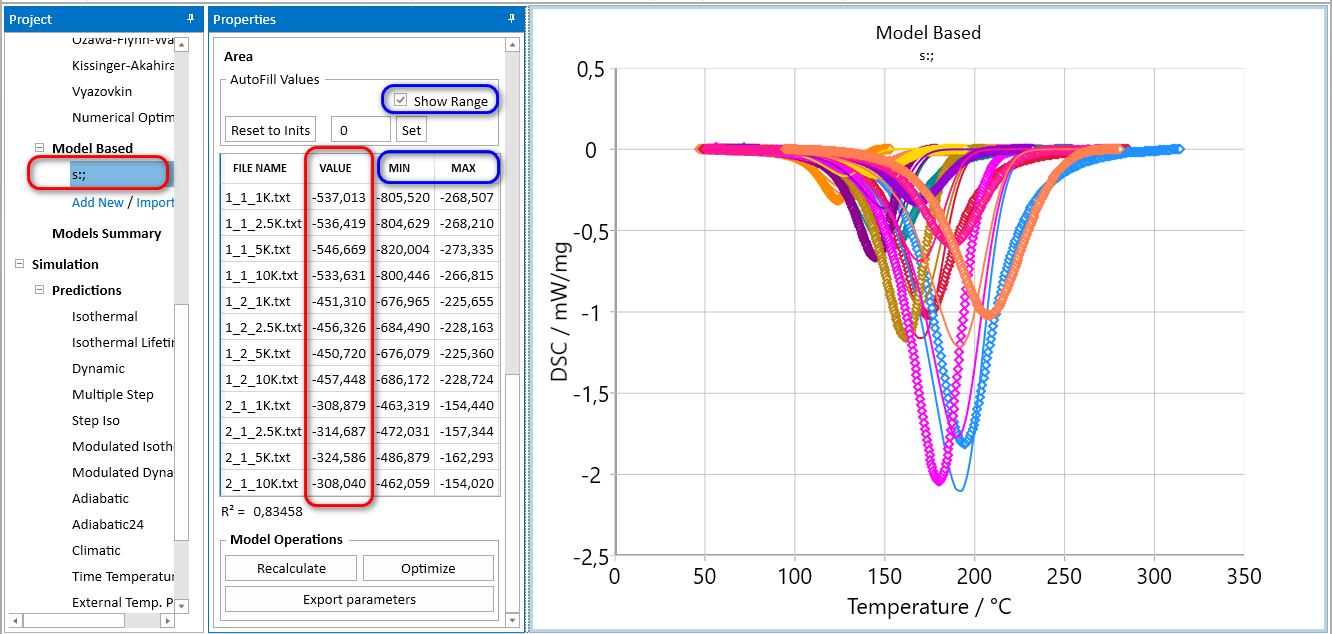
This new feature allows to fill the same effect value (e.g. Peak Area) for all measurements in kinetic model.
Each of experimental measurement has its own total effect, e.g. Peak Area for the DSC data. For reactions without complex effects (competing steps, diffusion control, fast crystallization, different ratios of reactants etc) peak areas for all measurements have very close values. However, sometimes the experimental values are not the same because of different reasons like presence of glass transition in the process or different ratios of epoxy/amine on the Figure below.
The new kinetic model in Model-based section of Analysis is always created with the experimental values of enthalpy for each measurement in the Area section.
Click on Show Range to view the minimal and maximal possible values columns for optimization of parameters in the model.
However, for kinetic model very often it is necessary to have the same value of enthalpy.
Now it is possible to set the same enthalpy value for all curves.
Please type your value near Set button and click on Set:
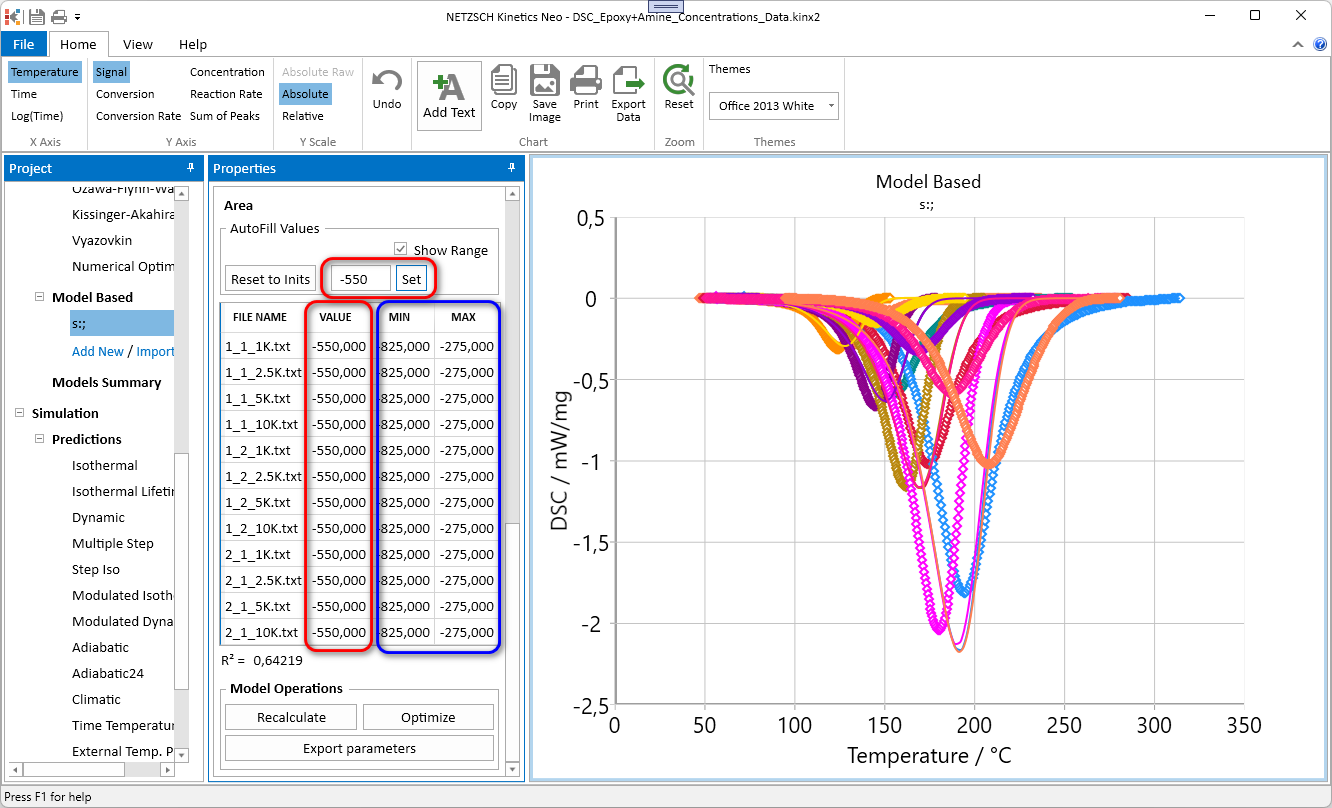
Here all Areas are filled to -550 J/g. Minimal and maximal values for these parameters are also recalculated.
Click on Reset To Inits will return Areas as well as their Minimum and Maximum values to the original experimental values.
Example of using this function is present in training Guide:
How to Add Enthalpy Dependence on Concentration Ratio for Two-Component Reaction
New: Fit for Conversion Rate. Important for integral Signals like TGA, DIL, Rheometry, DEA
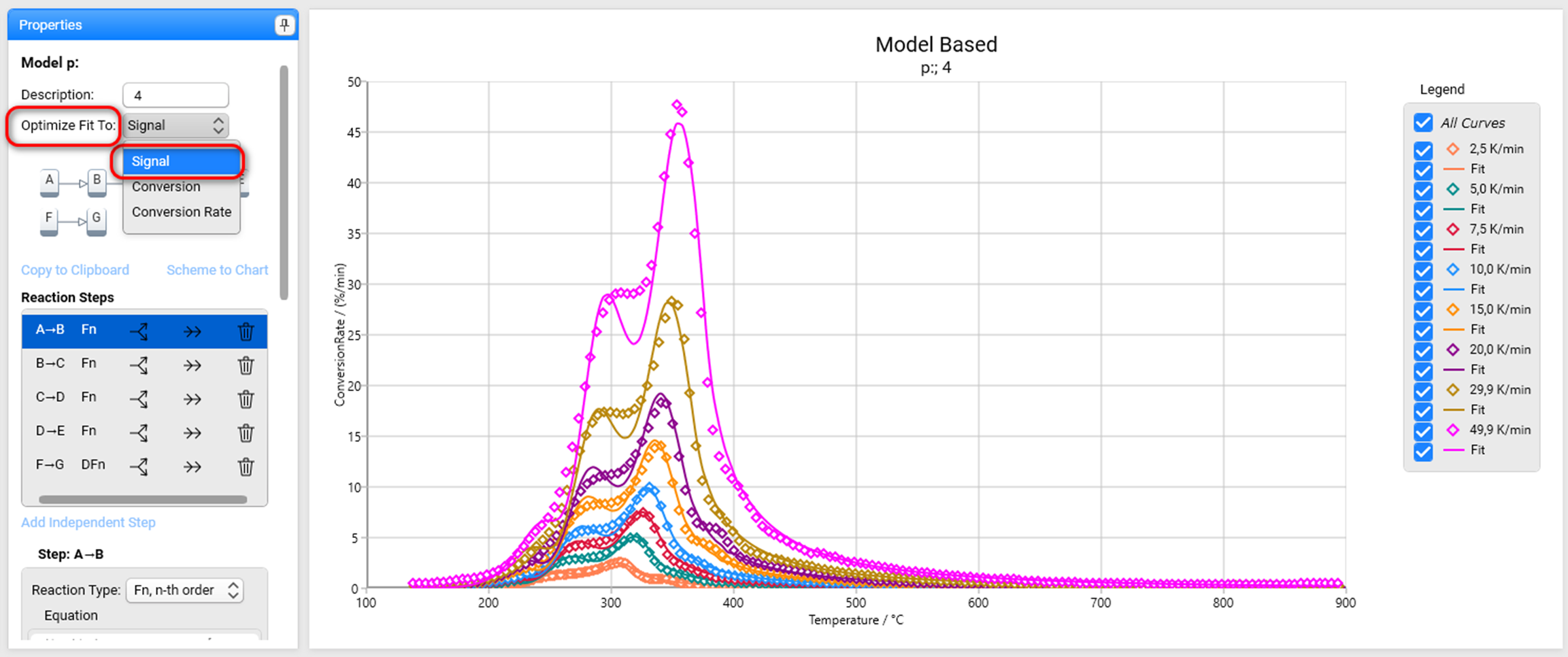
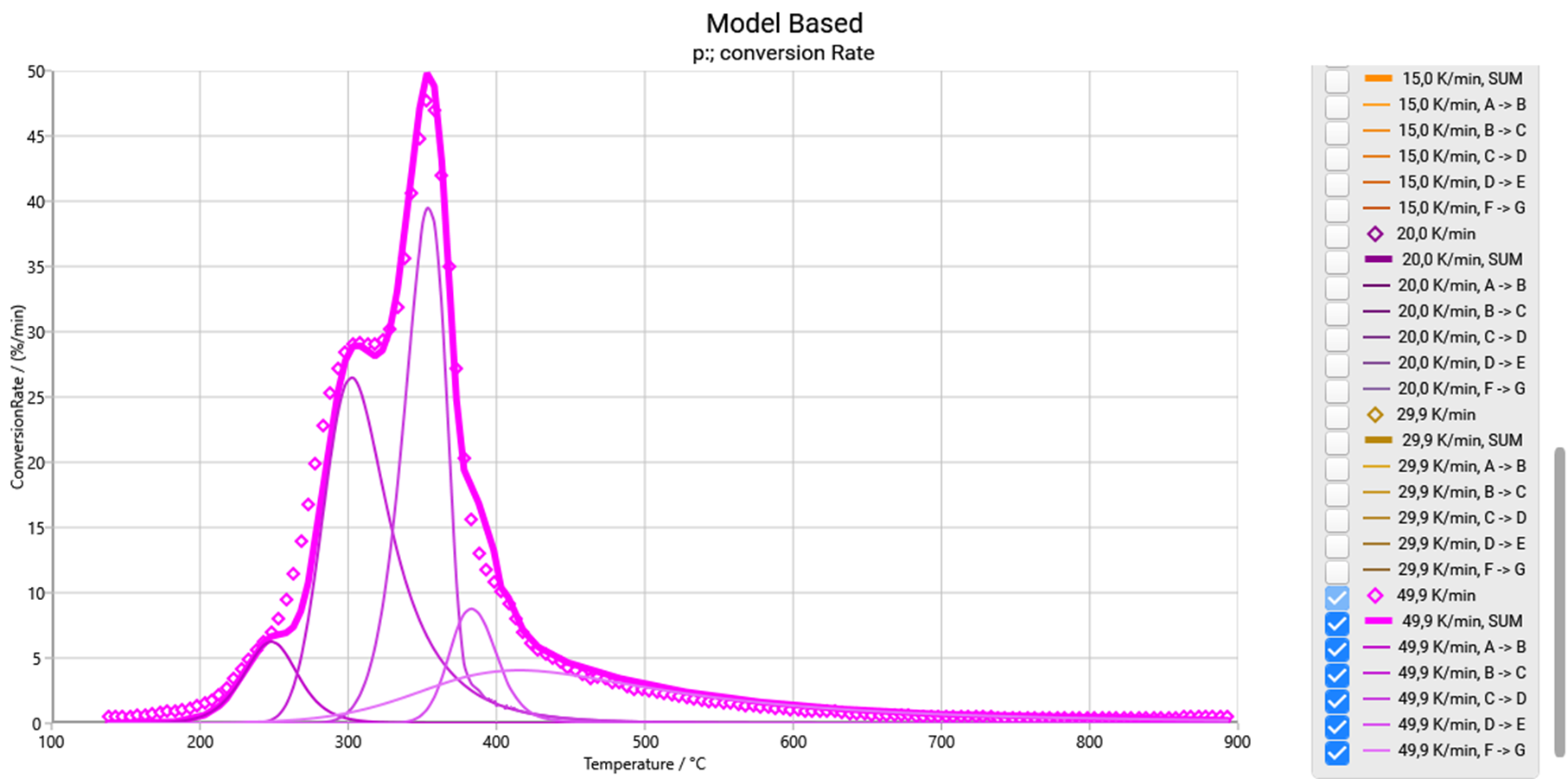
Up to now we have fit for signal and fit for conversion. But for multi-step reactions it is important to have the correct position for each individual reaction step. This position is seen on differential curves like DTG, DDIL etc. Correct peak position can be found, if this differential curve is analyzed. Therefore, we added now the possibility to make fit for the conversion rate.
Example: Old Optimization Fit To for Signal of pyrolysis data. This fit is good for TG signal (R²=0.9999), but has not very nice in the presentation of conversion rate:
New fit is done for Conversion Rate:
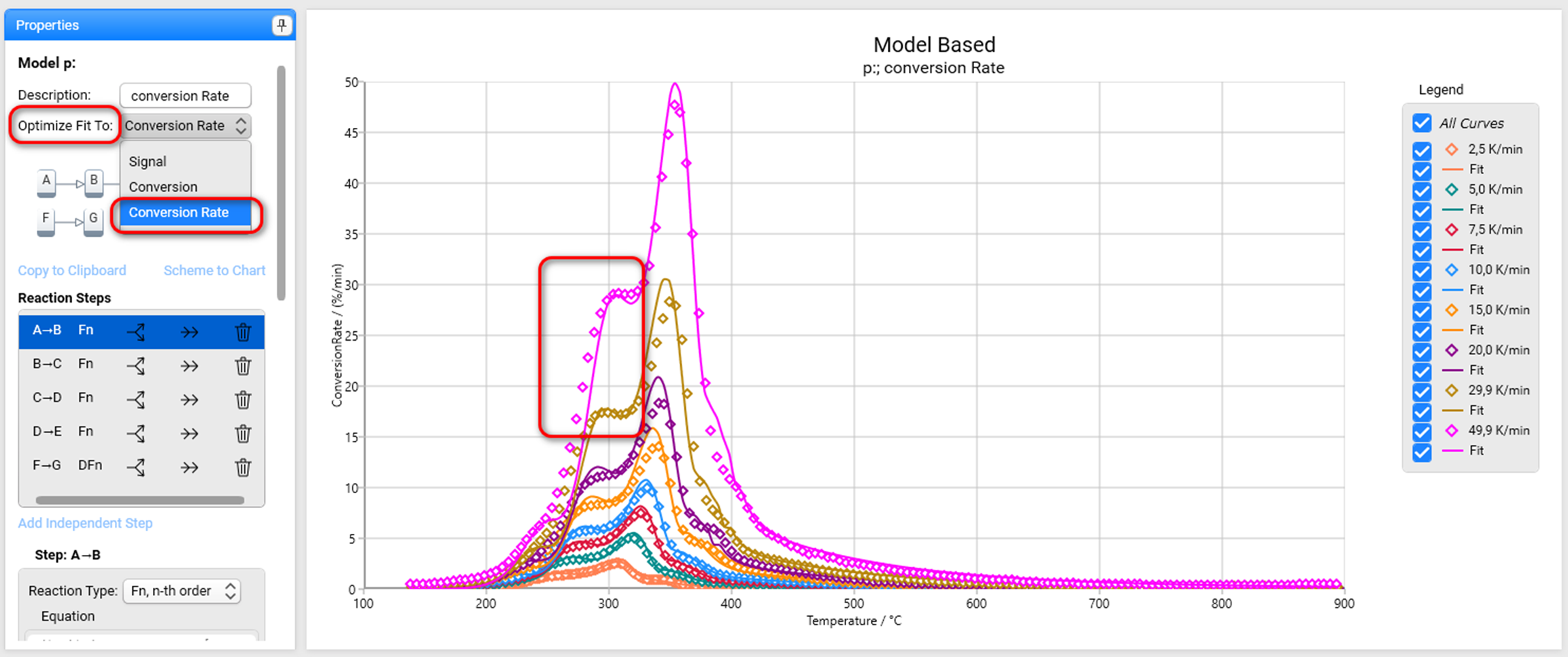
Now the peak positions are correct:
New: Standard dialogs can now set to use color themes
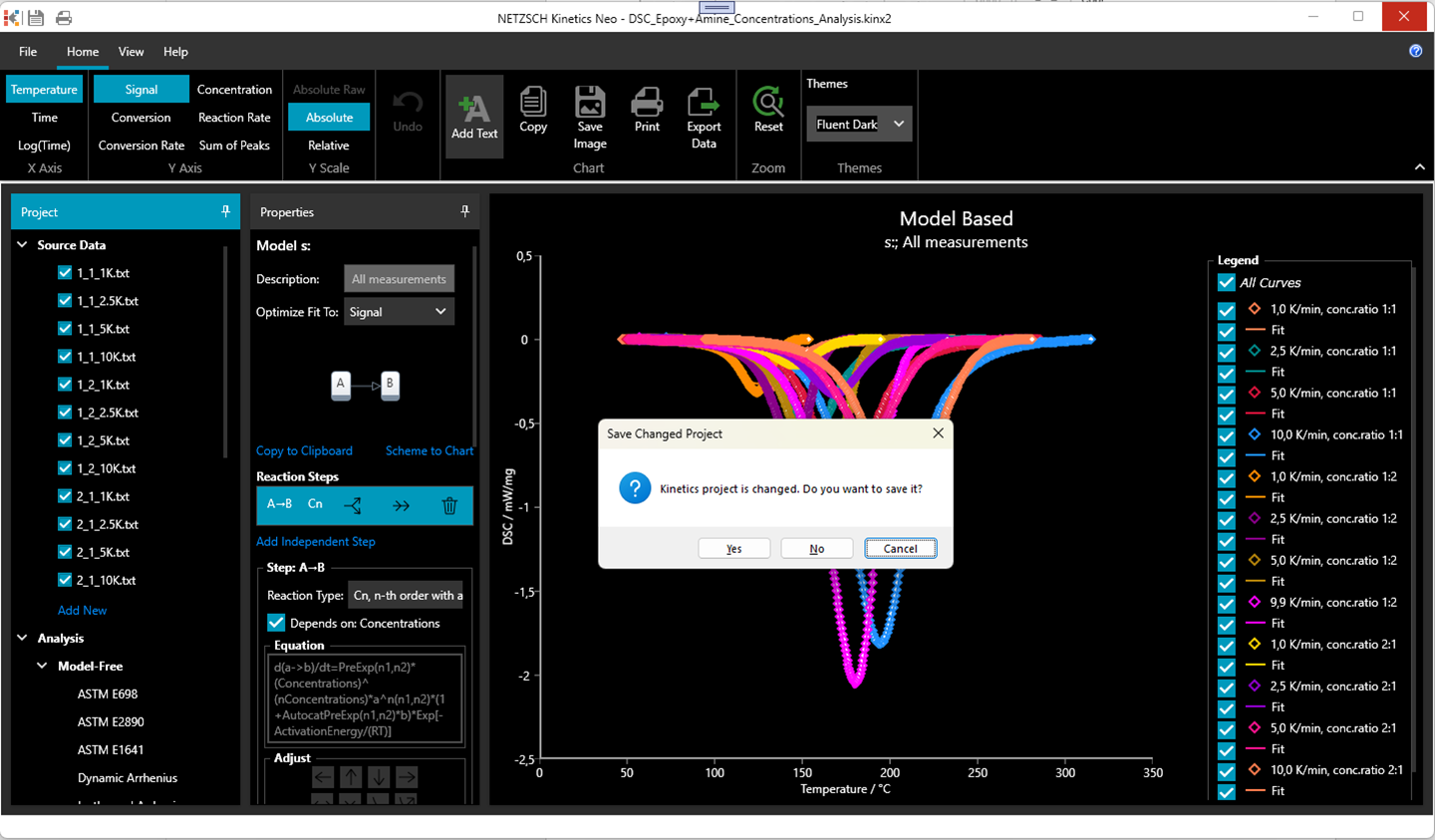
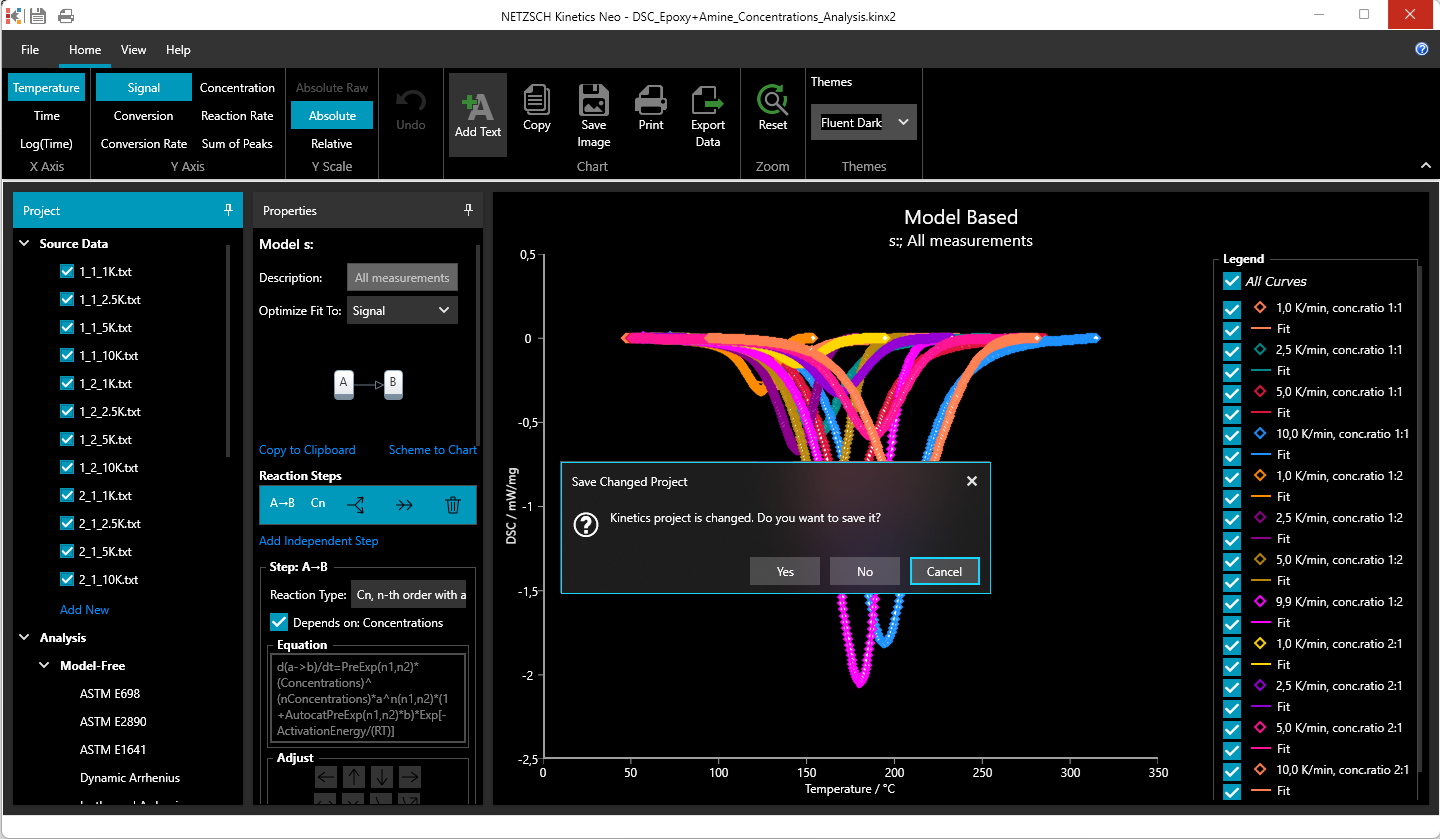
Now there are two possibilities to show standard dialogs (e.g. Save Project): either in default Windows style or in the style of the selected color theme:
1. Standard dialog uses Windows style (for example the dialog Close Window for unsaved file):
2. Standard dialog uses selected Kinetics Neo color theme (Dialog on Close Window for unsaved file: )
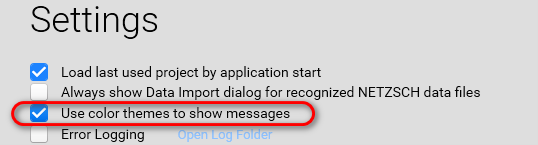
The switching between these two possibilities is in Settings by checkbox Use color themes to show messages:
New: Selecting a Weather Station directly on the Climatic Map with New Provider Azure Maps
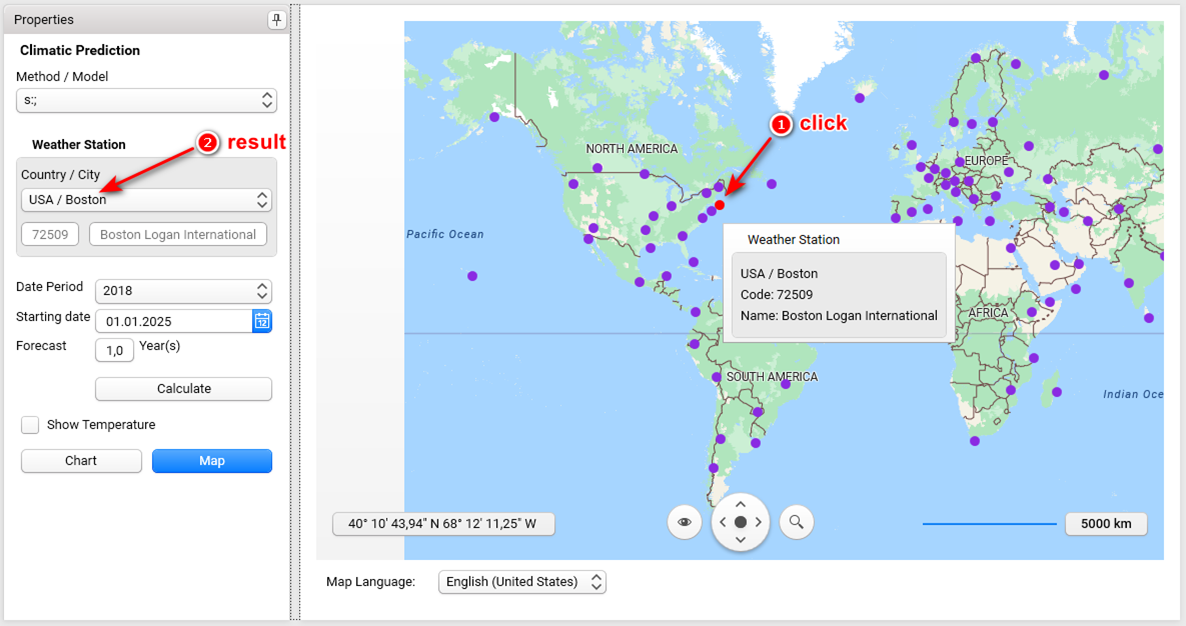
In the previous versions selection of the weather station was always from the Weather Station drop-down list on Properties panel.
In the version Kinetics Neo 3.5 we implement the new interactive map, where user can select weather station directly on the map just by clicking on it. Then the name of weather station selected on map, will be shown in drop-down list.
More details are in our guide
New: Possibility to open several data source (measurement) files in single action
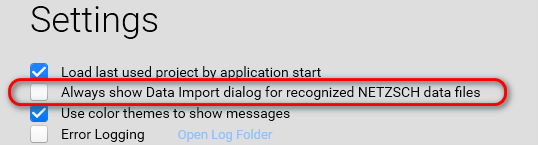
Now it is possible in single action to load several data source (measurement) files. This works for NETZSCH data files, if Data Import Dialog is turned off in settings:
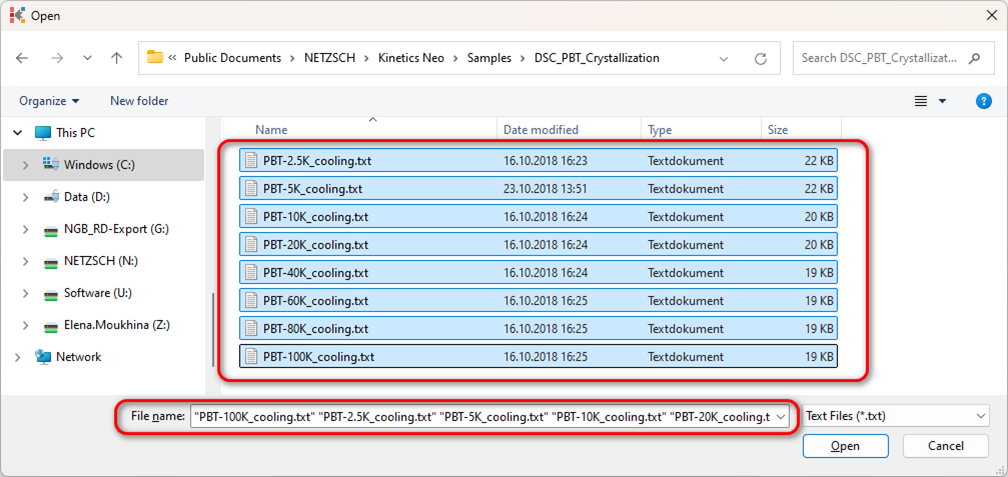
Example: Create new DSC project and select directory DSC_PBT_Crystallization for data sources. Then perform multiple selection of many NETZSCH files and load all of them with one Open click:
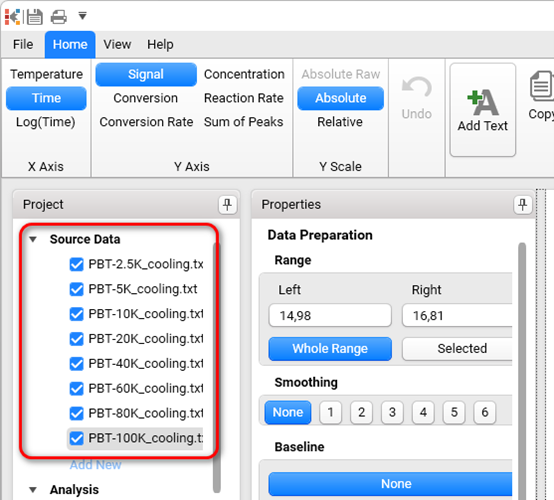
Result: multiple source data are added to the Kinetics Neo project.
Improved: Highlighted Dashed Series in Chart Legend Keep their Stroke-Space Proportions
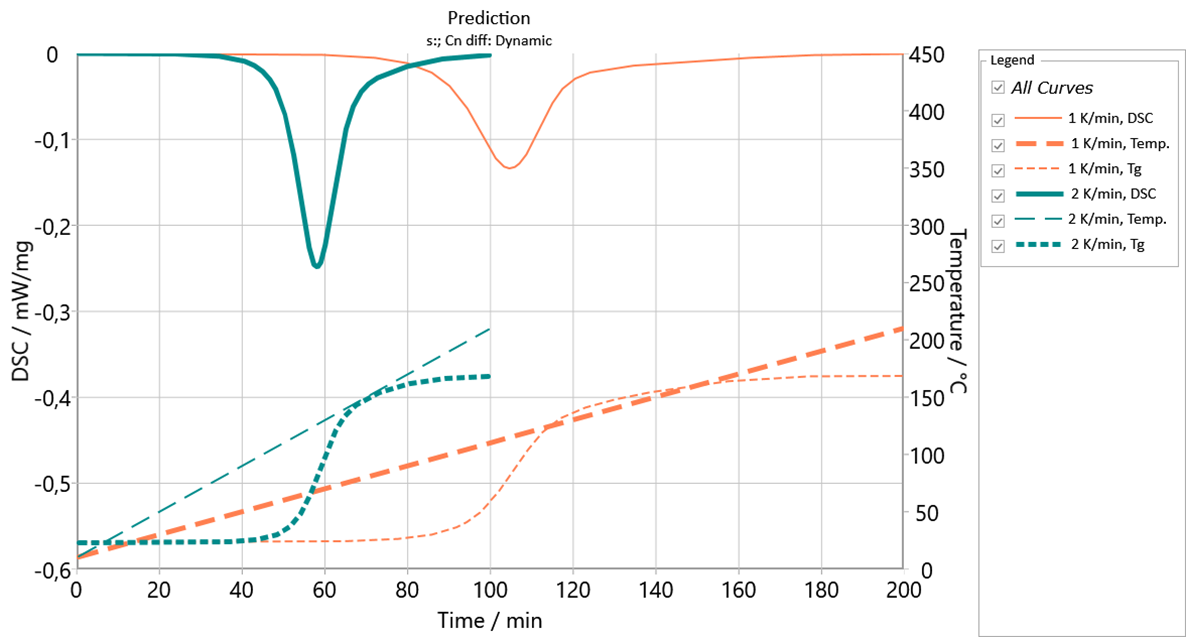
Figure presents three highlighted curves: DSC curve for 2K/min, temperature curve for 1K/min and glass transition temperature for 2K/min.
The length of the lines in legend is increased to show different dashed type correctly.