
What Is New in Kinetics Neo Version 3.8
Build 3.8.26149.21
Contents
2. New: Compatibility With Kinetics Lite Data Format
3.1 Example Fn: Decomposition of Calcium Oxalate Monohydrate
3.2 Example Cn: Curing of epoxy
3.3 Example An: Isothermal crystallization of Polyamide 12
4. New: Automated Parameter Fitting for KS, DFn, and SB Reactions
4.1 Example: Curing of Epoxy (Kamal-Sourour)
4.2 Example: Curing of Epoxy (Sestak-Berggren)
4.3 Example: Decompositin of a Polymer (DFn: n-th Order With Diffusion)
1. New: One-Click Importing of DSC and TG Data From NETZSCH Proteus Analysis Directly To Kinetics Neo
This new functionality is implemented for NETZSCH customers, who work with NETZSCH DSC, NETZSCH TG or NETZSCH STA instruments. These instruments provide signal types of DSC or TG which can be imported directly from NETZSCH Proteus Analysis (version 9.10 or higher) to Kinetics Neo software.
For kinetic analysis it is necessary to open in NETZSCH Protes Analysis software at least 3 experimental curves measured at different temperature conditions, more measurements are recommended. Usually, segments with different heating rates or segments with different isothermal conditions are used for kinetic analysis. For thermogravimetric measured data it is possible also use the experimental curve with connected segments having heating and isothermal segments together.
1.1 Importing of TG Data
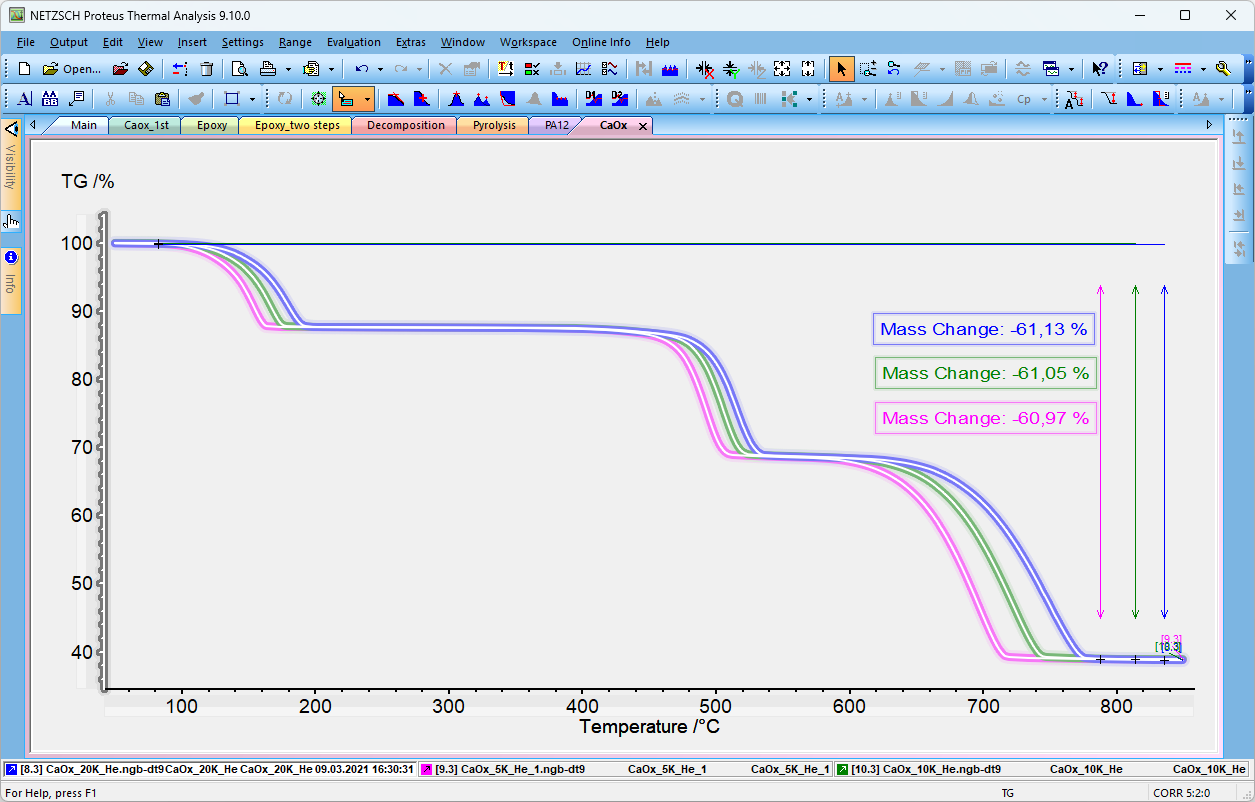
- In NETZSCH Protes Analysis software (version 9.10 or higher) open at least 3 experimental thermogravimetry curves measured at different temperature conditions.
- For each experimental curve evaluate the mass loss for the temperature (or time) range of interest. The evaluation ranges can be different for different curves.
- Select curves with mass change evaluation (click and ctrl+click on each curve or single click on TG axis):
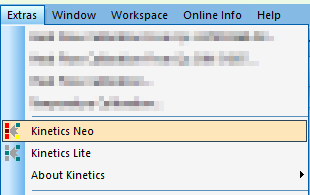
4. In NETZSCH Protes Analysis select Kinetics Neo from Extras menu Item.
Result: Kinetics Neo will be started, selected curves are automatically imported from Proteus Analysis into Kinetics Neo. Only selected ranges are loaded, file names can be seen in Source Data section of Project panel.
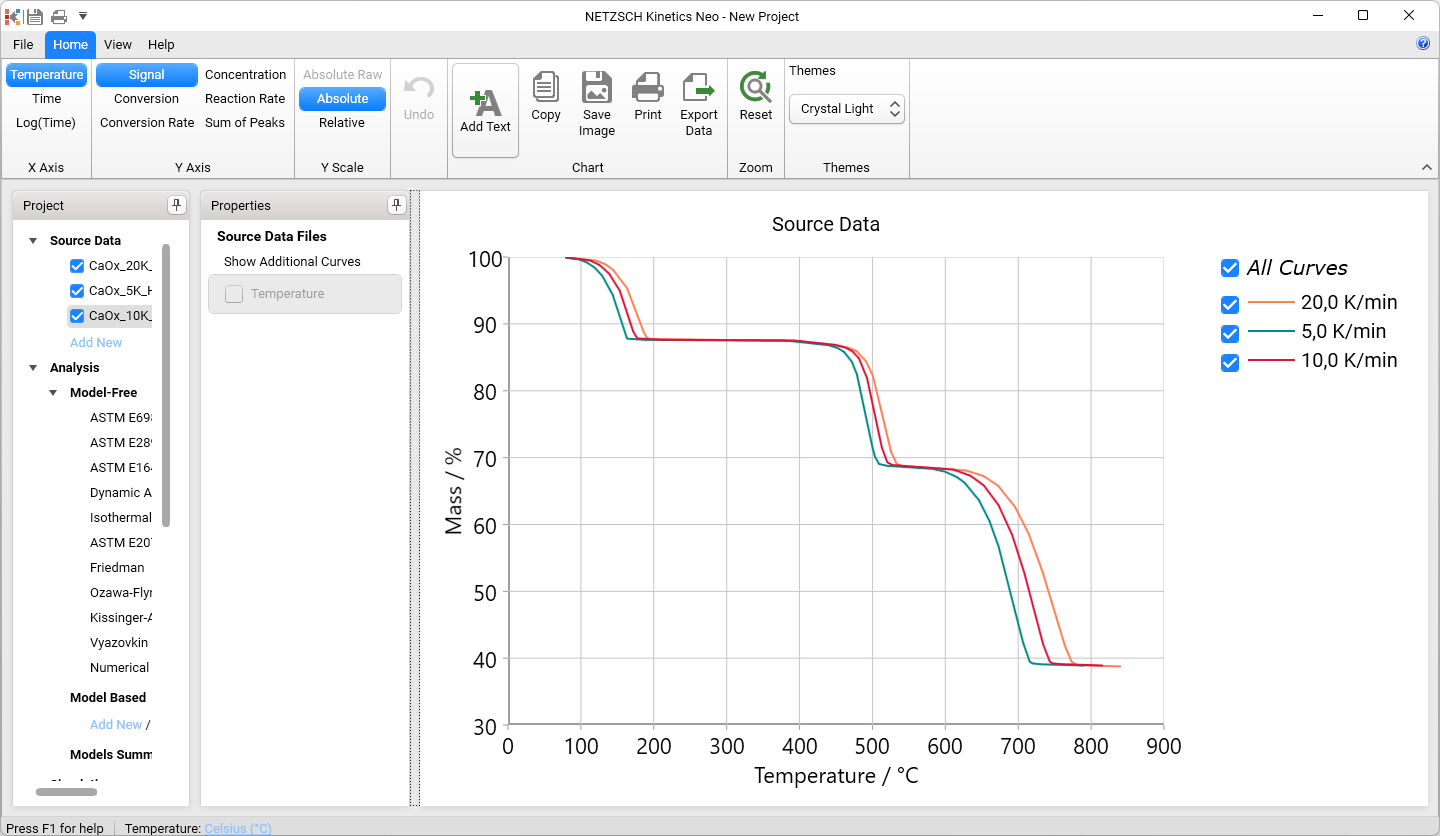
Now you can analyze imported TG data in NETZSCH Kinetics Neo software.
1.2 Importing of DSC Data
- In NETZSCH Protes Analysis software open at least 3 experimental DSC curves measured at different temperature conditions
- For each experimental curve evaluate the peak area for the temperature (or time) range of interest. Please select the baseline, which is necessary for enthalpy evaluation. The evaluation ranges and the baselines can be different for different DSC curves.
- Select curves with peak area evaluation (click and ctrl+click on each curve or single click on DSC axis):

4. In NETZSCH Protes Analysis select Kinetics Neo item from Extras menu.
Result: Kinetics Neo is started where selected curves are automatically imported from Proteus Analysis into Kinetics Neo. Only selected ranges are loaded, baseline is subtracted, file names can be seen in Source Data section of Project panel.
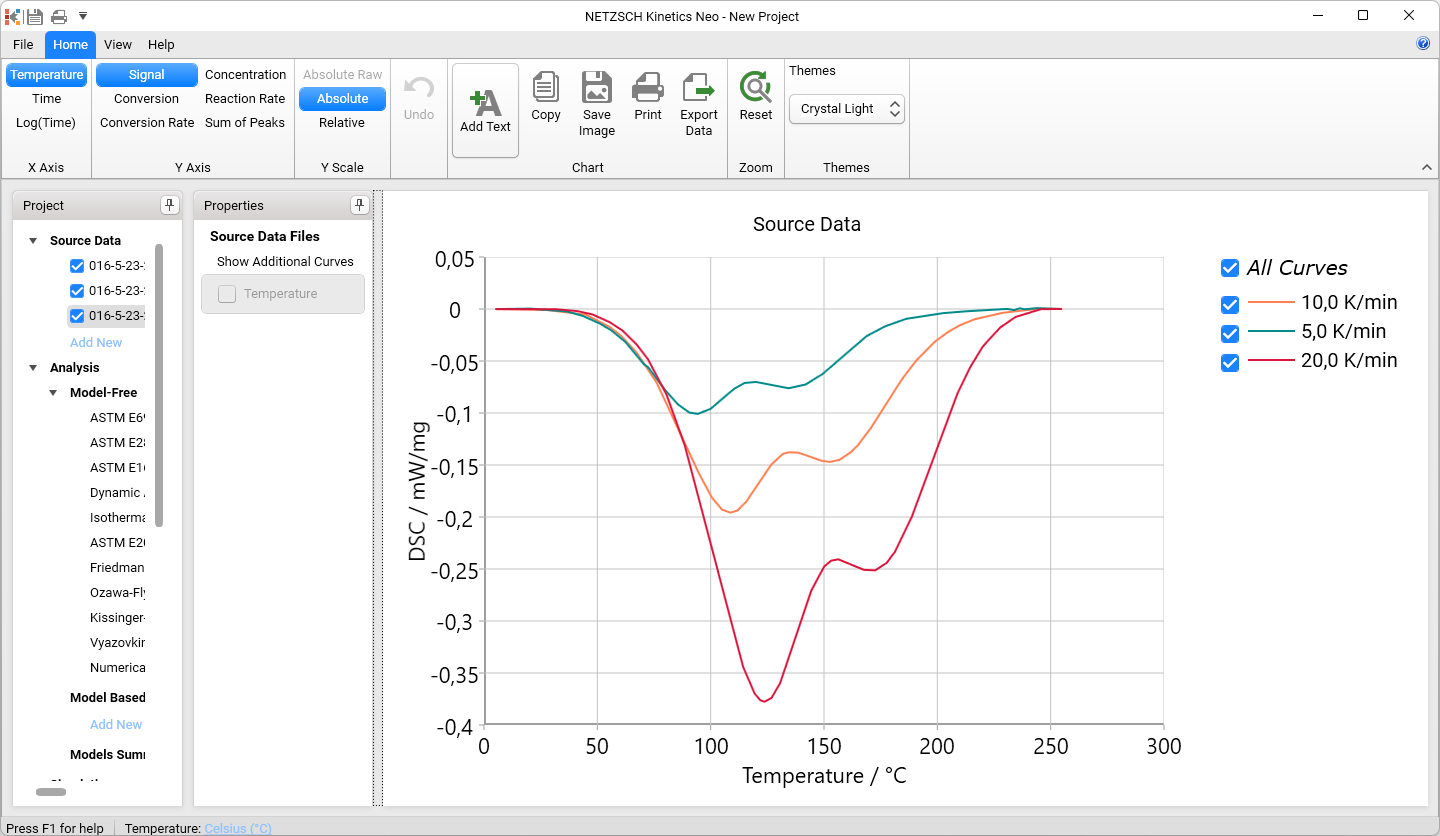
Now you can analyze imported DSC data in NETZSCH Kinetics Neo software.
2. New: Compatibility With Kinetics Lite Data Format
We have new NETZSCH Kinetics Lite software, release of version Kinetics Lite 1.0 in July 2026. Kinetics Lite 1.0 has file format KLTX.
Kinetics Neo software can open file projects created in Kinetics Lite with this format *.ktlx.
Kinetics Neo can not save own projects in KLTX format, because Kinetics Lite does not support multi-step kinetic models and some other features.
3. New: One-Click Search of the Best Reaction Types for Reactions: A2, A3, An, C1, Cn, D1, D2, D3, D4, F1, F2, Fn.
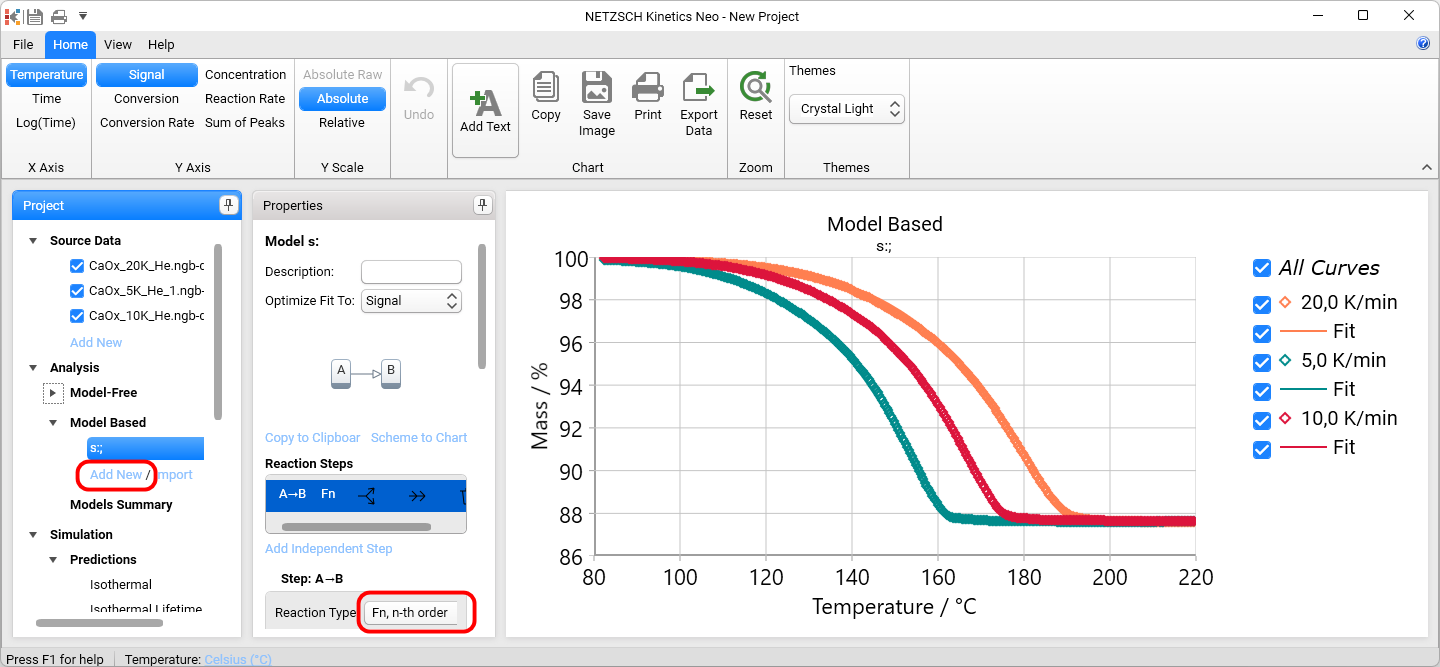
In Kinetics Neo software click on Add New item for Model-Based Analysis section in the Project Panel to create the new single-step model. Now the optimal reaction type is selected automatically from the following types:
- A2 (two-dimensional Avrami nucleation) ,
- A3 (three-dimensional Avrami nucleation),
- An (n-dimensional Avrami nucleation),
- C1 (First order reaction with autocatalysis),
- Cn (n-th order reaction with autocatalysis),
- D1 (one-dimensional Diffusion),
- D2 (two-dimensional Diffusion),
- D3 (three-dimensional diffusion Jander’s type),
- D4 (three-dimensional diffusion Ginstling-Brounstein type),
- F1 (first order reaction),
- F2 (second order reaction),
- Fn (n-th order reaction).
For the best reaction type the kinetic parameters are also optimized automatically to achieve the best fit.
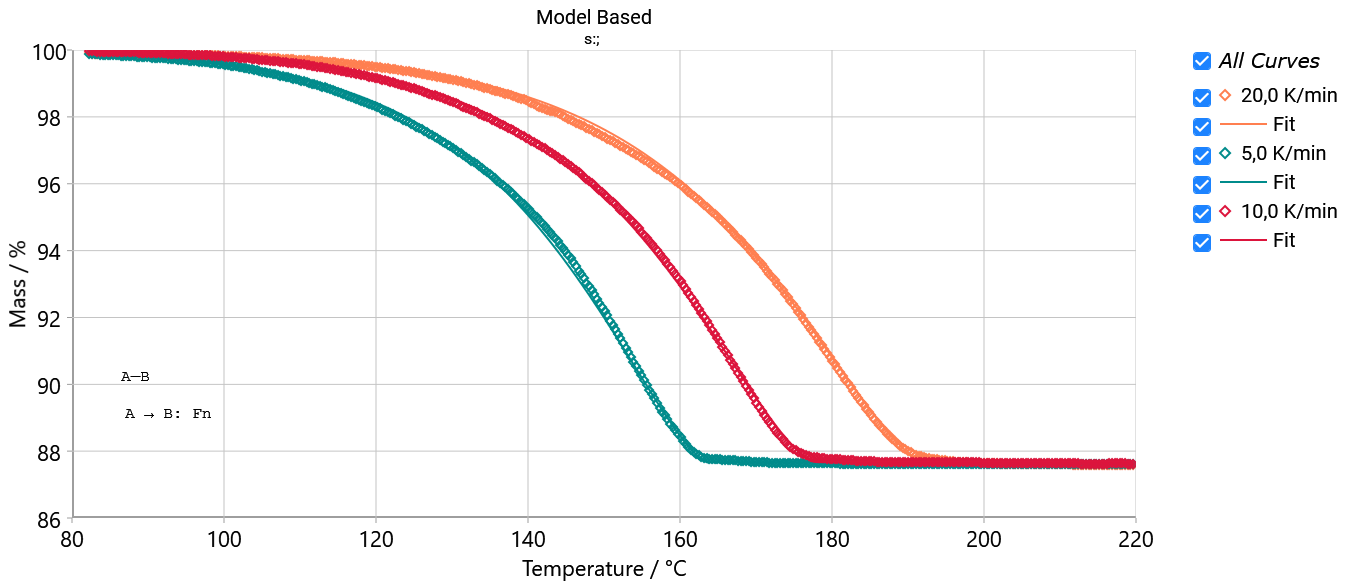
3.1 Example Fn: Decomposition of Calcium Oxalate Monohydrate
Decomposition of Calcium Oxalate Monohydrate. The first decomposition step with water release is recognized by the software as n-th order reaction Fn:
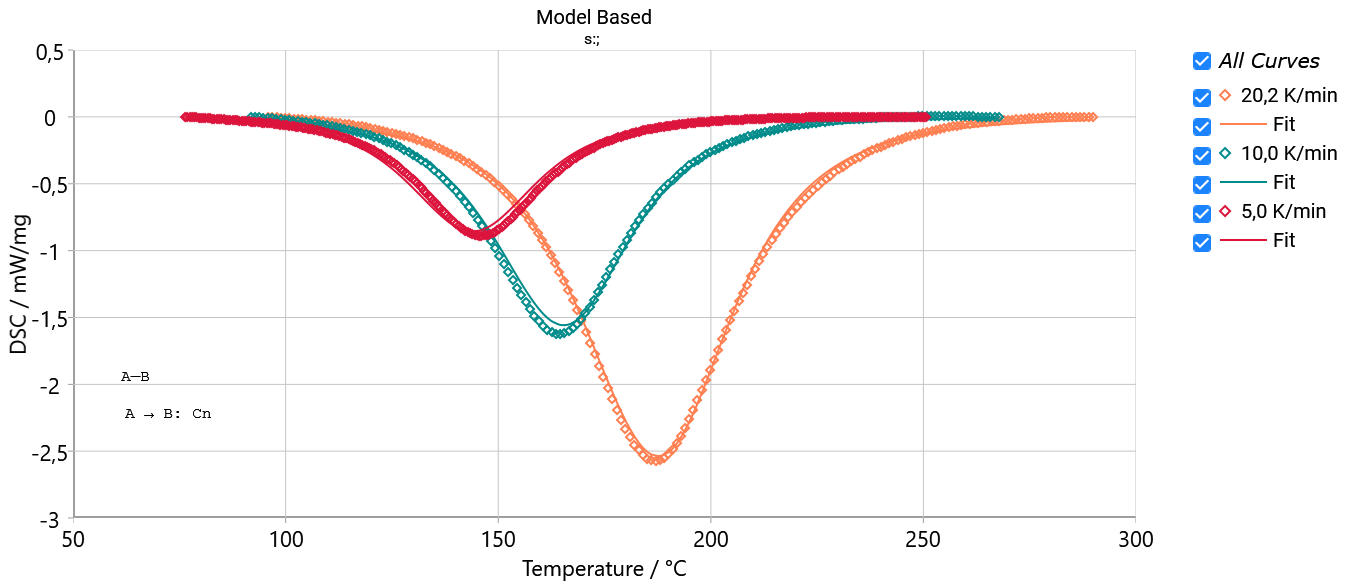
3.2 Example Cn: Curing of epoxy
Curing of epoxy. Curing reaction is recognized by the software as reaction with autocatalysis Cn:
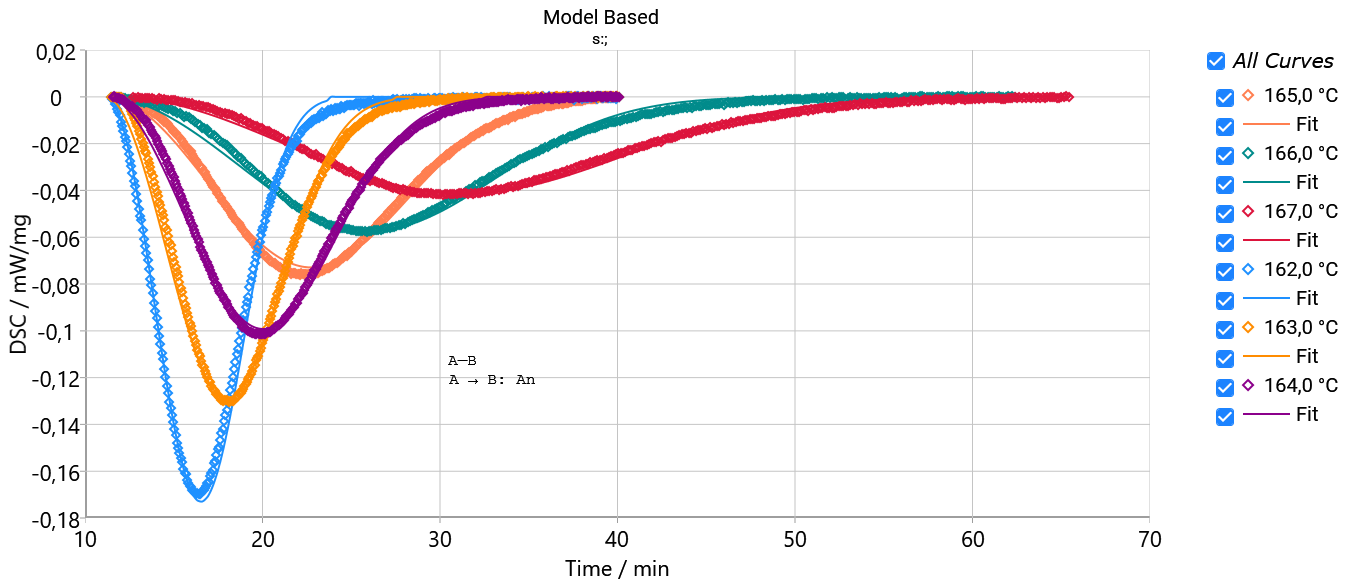
3.3 Example An: Isothermal crystallization of Polyamide 12
Isothermal crystallization of Polyamide 12. Crystallization is recognized by the software as nucleation reaction of Avrami type An:
4. New: Automated Parameter Fitting for KS, DFn, and SB Reactions
If user selects one of reaction types:
- KS (Kamal-Sourour),
- DFn (n-th order with diffusion)
- SB (Sestak-Berggren)
for single-step reaction manually then kinetic parameters are optimized automatically to achieve the best fit.
4.1 Example: Curing of Epoxy (Kamal-Sourour)
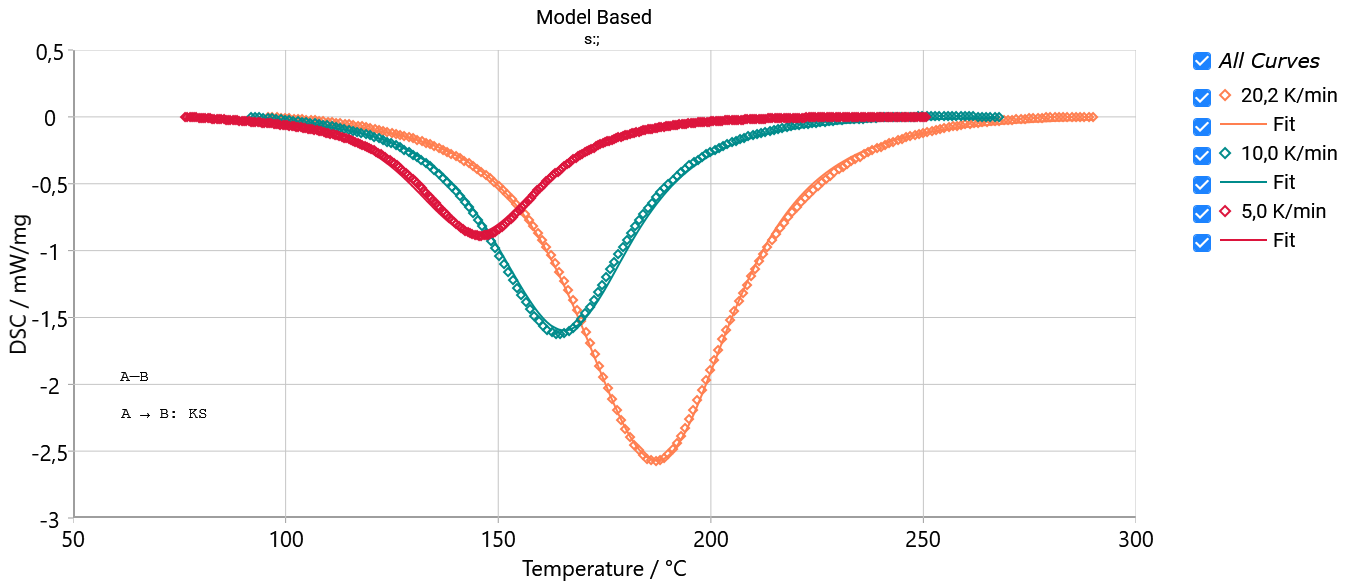
Selected reaction type Kamal-Sourour with automatic searching of the optimal parameters for the best fit.
4.2 Example: Curing of Epoxy (Sestak-Berggren)
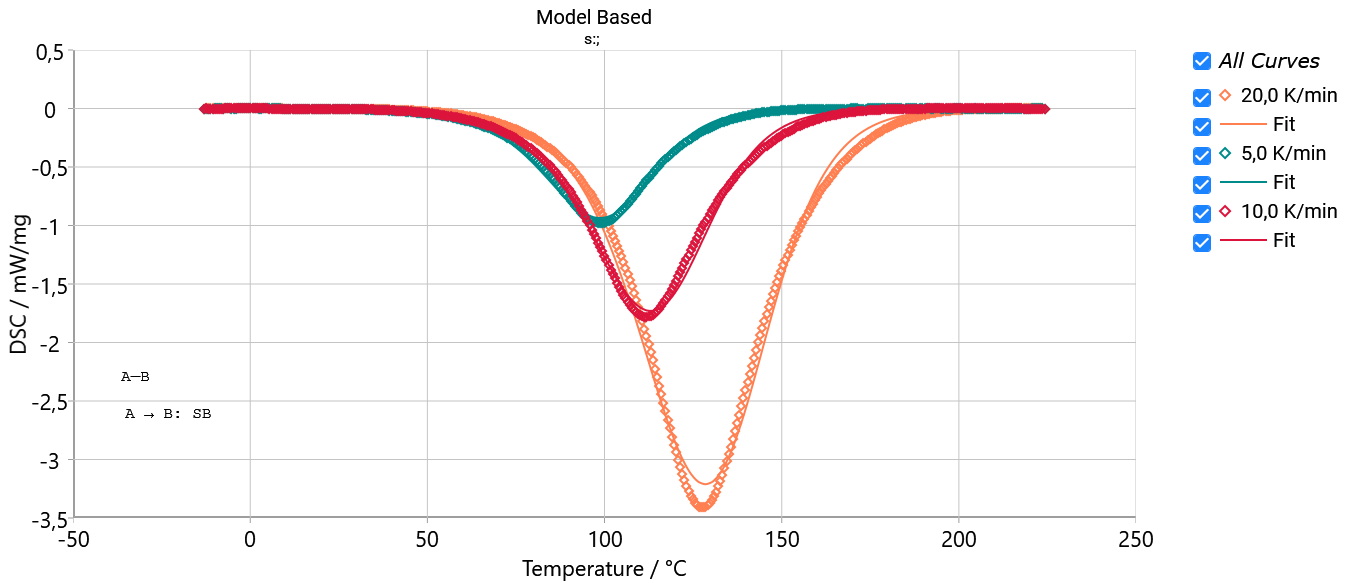
Selected reaction type Sestak-Berggren with automatic searching of the optimal parameters for the best fit.
4.3 Example: Decompositin of a Polymer (DFn: n-th Order With Diffusion)
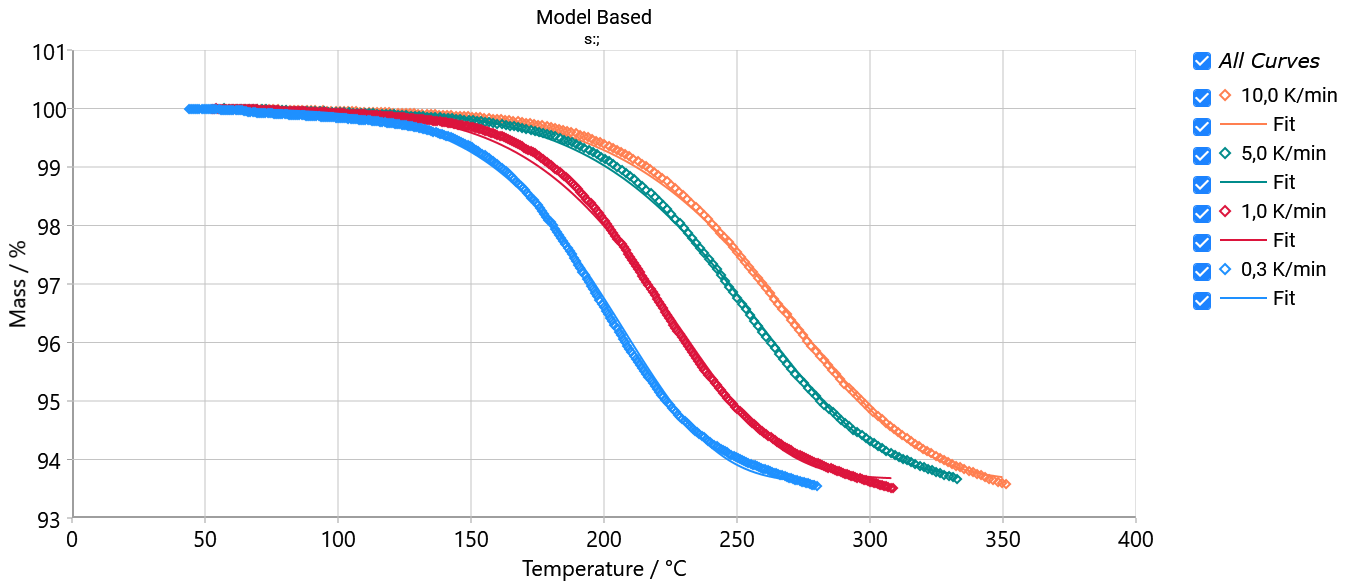
Selected reaction type DFn (n-th order with diffusion) with automatic searching of the optimal parameters for the best fit.
5. Other Improvements
- Improved: models with different mass ratio: Integration over conversion for calculation of the common pre-exponent.
- Fixed: Opening of old KINX file with Glass Transition table showed no model-based fit curves. Now Glass Transition table and model fit are recalculated during opening of old KINX file.
- Fixed: F-Test statistic now ignores case when analysis method is NotSelected.